8. Generate Levels Automatically
Use the Procedural Single-Level Auto-Generator and Batch Generator to create hundreds of balanced stages with difficulty scaling.
8.1 Generate one level
Open Procedural Auto-Generator.
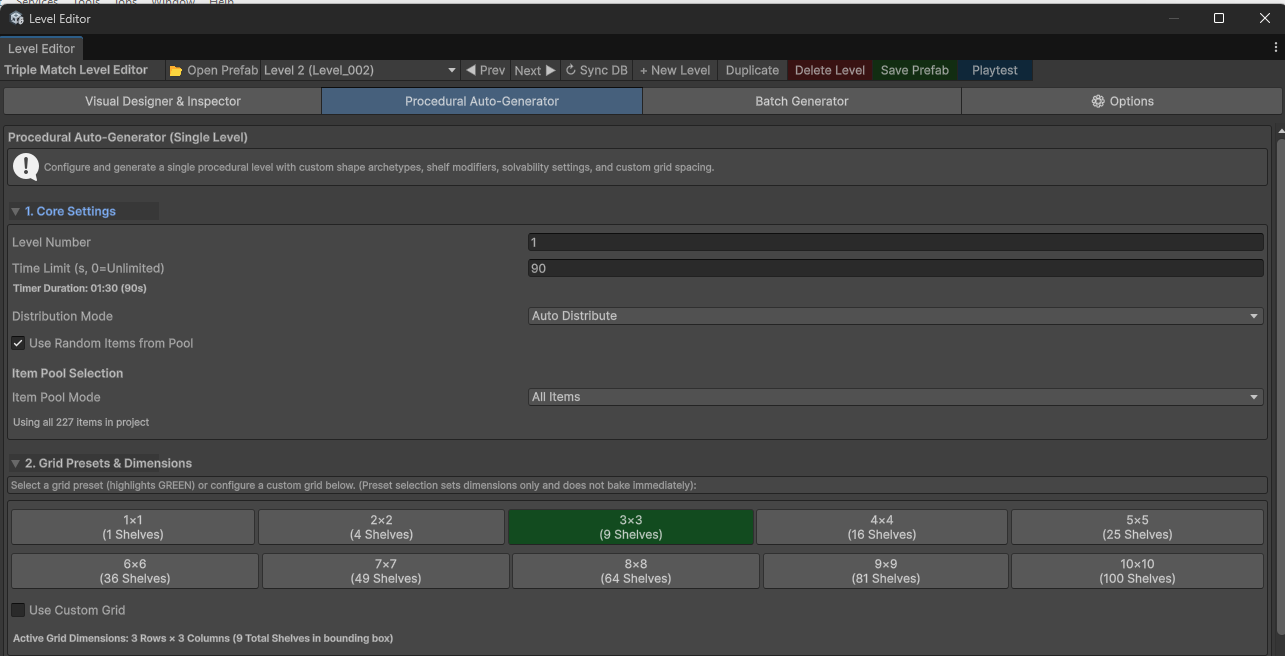
| Setting | What it does |
|---|---|
| Level Number | Chooses the numbered level to generate. Use an unused number for new content. |
| Time Limit | Sets the timer; 0 means unlimited. |
| Distribution Mode | Chooses saved/manual placement or runtime auto distribution. |
| Use Random Items from Pool | Uses random choices from the selected pool. |
| Item Pool Mode / Range | Chooses all items or a limited index range. |
| Grid preset | Chooses dimensions from 1 x 1 to 10 x 10. Selecting a preset does not generate immediately. |
| Use Custom Grid | Lets you set rows and columns separately, from 1 to 10. |
| Active Grid Dimensions | Shows the bounding grid. The chosen shape may use fewer shelves. |
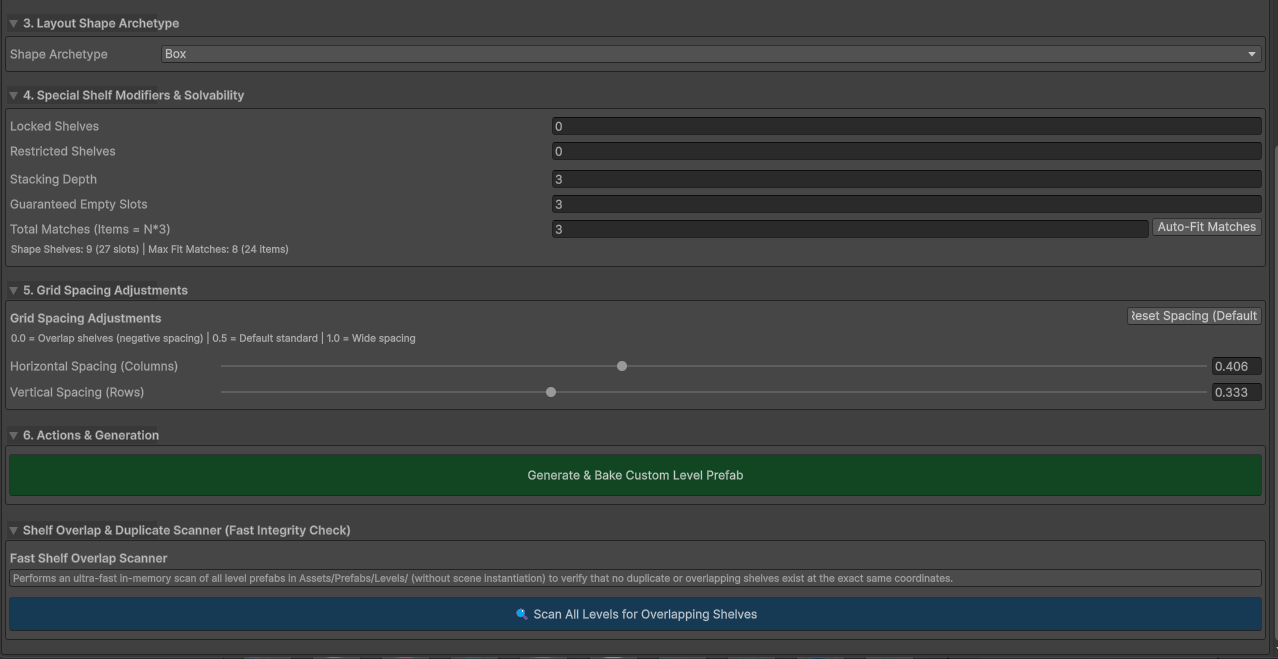
| Setting | What it does |
|---|---|
| Shape Archetype | Chooses the shelf arrangement. |
| Alphabet Character | Chooses a letter when the Alphabet shape is active. |
| Notches Count | Chooses how many edge cutouts to use with Random Notches. |
| Locked Shelves | Number of locked shelves to add. |
| Matches Required to Unlock | Matches needed before those locks open. |
| Restricted Shelves | Number of restricted shelves to add. |
| Restricted Shelves Can Contain Items | Allows items inside those shelves. |
| Stacking Depth | Maximum layers per slot. |
| Guaranteed Empty Slots | Reserves room for moves. |
| Total Matches / Auto-Fit Matches | Sets the requested groups of three or fits the capacity. |
| Horizontal / Vertical Spacing | Changes the gaps between shelves. |
| Generate & Bake Custom Level Prefab | Creates and saves the configured level. |
| Shelf overlap scanner | Checks saved levels for duplicate or overlapping shelves. |
Shape choices: Box, Hollow Ring, Staggered Brick, Staircase, Inverted Staircase, Pyramid, Inverted Pyramid, Left Pyramid, Right Pyramid, Cut-Out Center, Random Notches, Alphabet, and Cross/Plus.
Easy starting recipe: Use an unused level number, a 3 x 3 grid, Box shape, Auto Distribute, no modifiers, depth 1, several empty slots, and 90 seconds. Generate it, open it in the Visual Designer, check it, and playtest.
Generating into an existing level number can replace its content. Check the number before generating.
8.2 Generate a batch
Open Batch Generator. Start with a small unused range so you can check the results before making a large set.
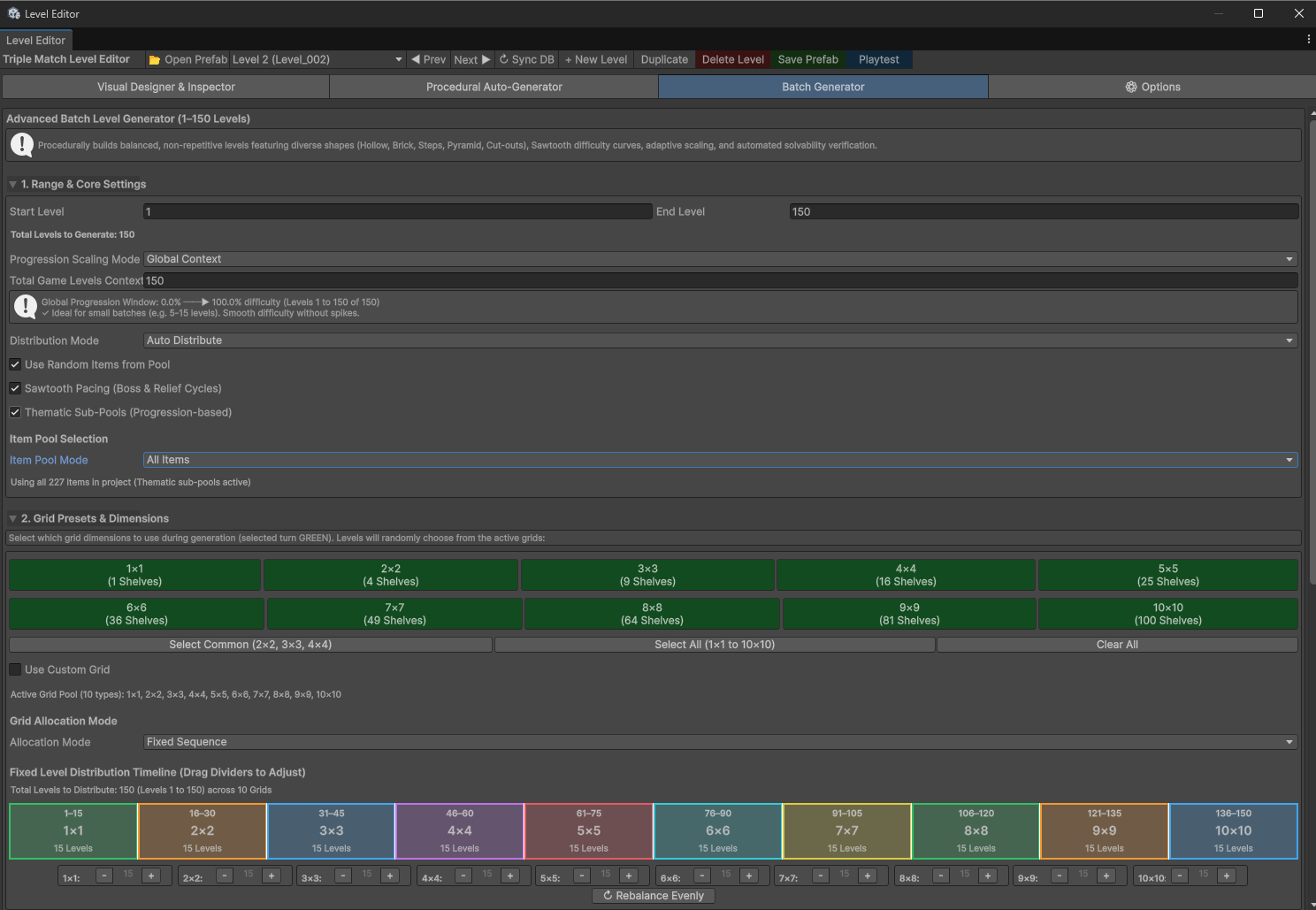
| Setting | What it does |
|---|---|
| Start Level / End Level | The inclusive range to create. For example, 20-24 creates five levels. |
| Progression Scaling Mode | Chooses how difficulty changes across the range. |
| Global Context | Uses each level's position in the whole planned game. Useful for adding a small batch to a longer game. |
| Total Game Levels Context | The total planned level count for Global Context. |
| Batch Relative | Runs from easy to hard inside this batch. |
| Custom Range | Uses your selected start and end difficulty. |
| Start / End Difficulty | Values from 0 to 1. A value of 0.3 means 30% of the generator's difficulty scale. |
| Distribution Mode | Chooses Manual or Auto Distribute. |
| Use Random Items from Pool | Enables random item choices. |
| Sawtooth Pacing | Adds harder and easier cycles instead of making every level harder than the last. |
| Thematic Sub-Pools | Uses smaller item groups as progression changes. |
| Item Pool Mode | Chooses All Items or Range. A specific Range bypasses the thematic sub-pool choice. |
| Start / End Item Index | Limits the usable items. |
| Grid buttons | Enable the grid sizes the batch may use. Green means selected. |
| Select Common / Select All / Clear All | Quickly changes the selected grid set. |
| Use Custom Grid | Adds custom row and column dimensions. |
| Allocation Mode: Random | Chooses grids from the active set. |
| Allocation Mode: Fixed Sequence | Assigns a planned number of levels to each selected grid size. |
| Fixed distribution timeline | Drag its dividers, use count controls, or Rebalance Evenly to change how many levels use each grid. |
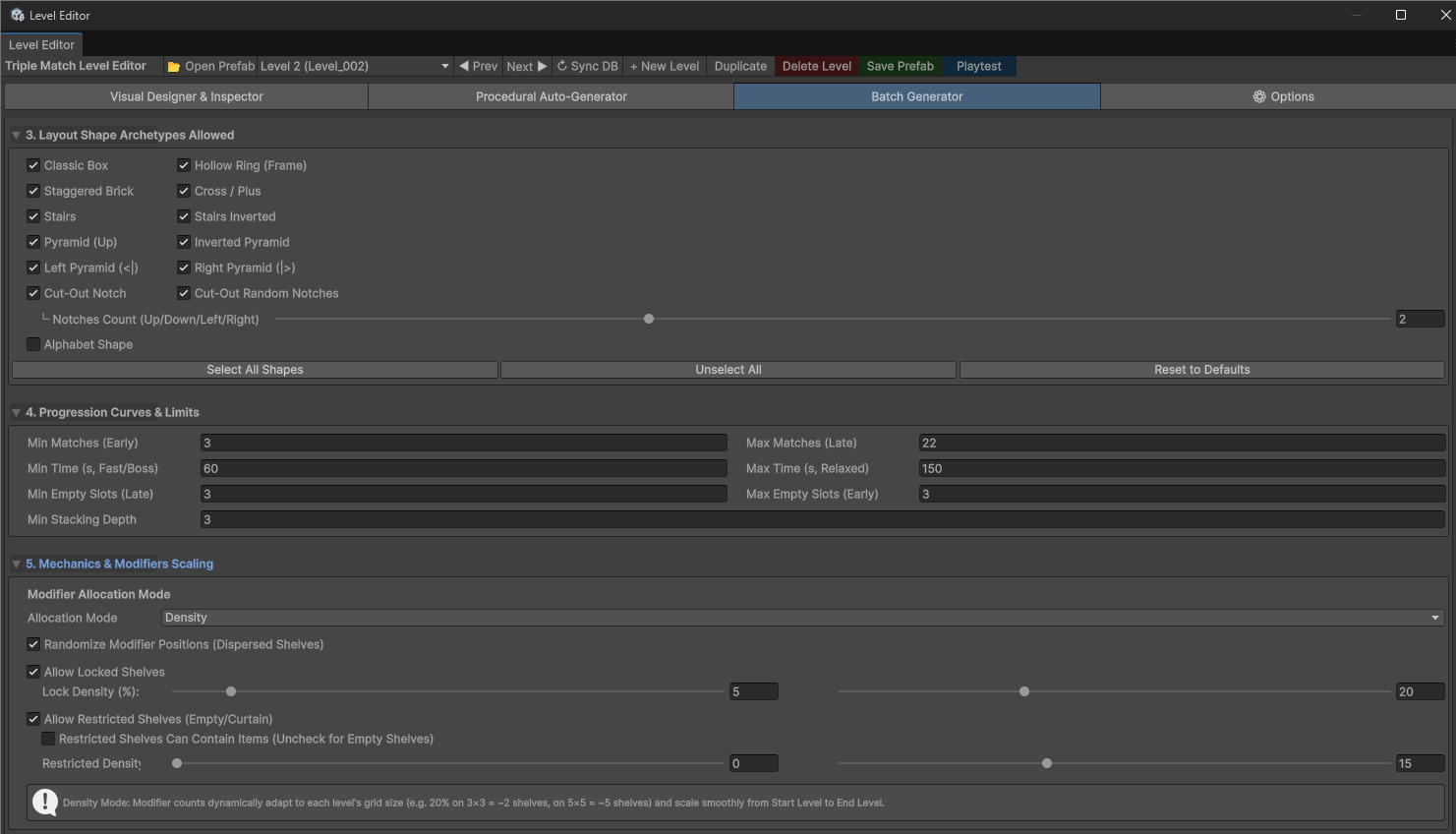
| Setting | What it does |
|---|---|
| Shape toggles | Choose which shape types are allowed. |
| Notches Count / Alphabet Character | Configure the relevant shape. |
| Select All Shapes / Unselect All / Reset to Defaults | Quickly changes the allowed shapes. |
| Min Matches (Early) / Max Matches (Late) | Controls the early-to-late item workload. |
| Min Time (Fast/Boss) / Max Time (Relaxed) | Sets the available timer range. |
| Min Empty Slots (Late) / Max Empty Slots (Early) | Gives later levels less movement room and early levels more room. |
| Min Stacking Depth | Sets the minimum starting depth for generation. |
| Modifier Allocation Mode: Density | Calculates modifier counts as a percentage of shelves. |
| Modifier Allocation Mode: Range | Uses a minimum and maximum shelf count. |
| Randomize Modifier Positions | Spreads modifiers across different shelves. |
| Allow Locked Shelves | Includes locks using the density or count range. |
| Allow Restricted Shelves | Includes restricted shelves using the density or count range. |
| Restricted Shelves Can Contain Items | Lets generated restricted shelves hold items. |
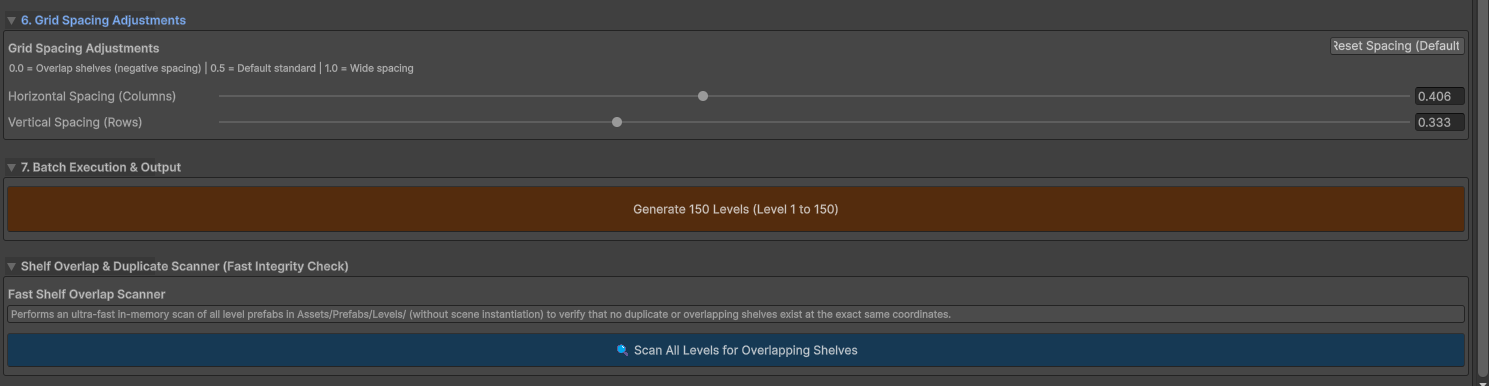
Set spacing, check the level range, then press Generate. After generation, inspect a level near the start, middle, and end of the batch. Run checks and playtest them.
Generation uses several settings together. More items, more depth, fewer empty spaces, and more locks can all increase difficulty. Change a few settings at a time.
8.3 Options tab
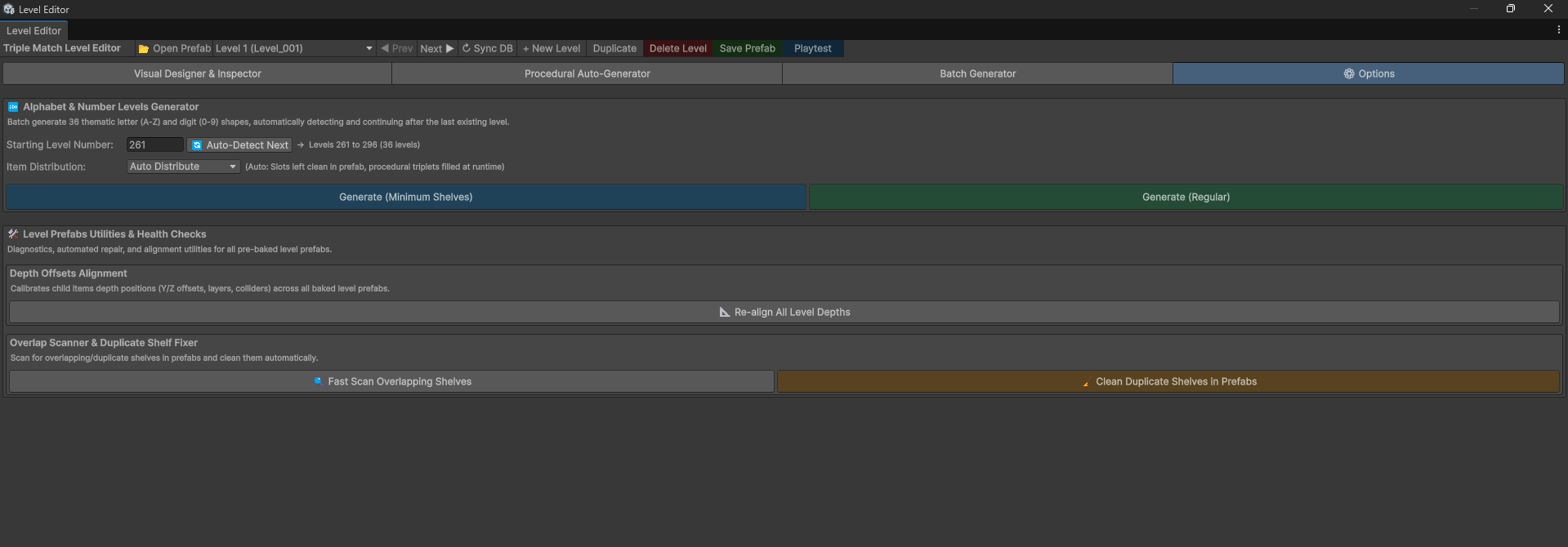
| Option | What it does |
|---|---|
| Starting Level Number | First level number for the alphabet/number batch. |
| Auto-Detect Next | Starts after the last detected level. |
| Item Distribution | Chooses Manual or Auto Distribute. |
| Generate (Minimum Shelves) | Creates compact letter and number layouts. |
| Generate (Regular) | Uses the regular 5 x 5 bitmap layout style. |
| Re-align All Level Depths | Updates saved item depth positions and related setup across baked levels. |
| Fast Scan Overlapping Shelves | Reports duplicate or overlapping shelf positions. |
| Clean Duplicate Shelves in Prefabs | Removes duplicate shelves from saved level prefabs. |
The alphabet/number batch creates 36 layouts: A-Z and 0-9. Maintenance tools can change many saved levels. Use them when needed and keep a backup first.