14. Choose When Ads Appear
Control banner triggers, app open ads, interstitial frequencies, mid-game timers, and rewarded continue integrations.
This section covers game-side timing and calls only.
Select the ads manager object in the scene and expand Game Ad Flow Controller.
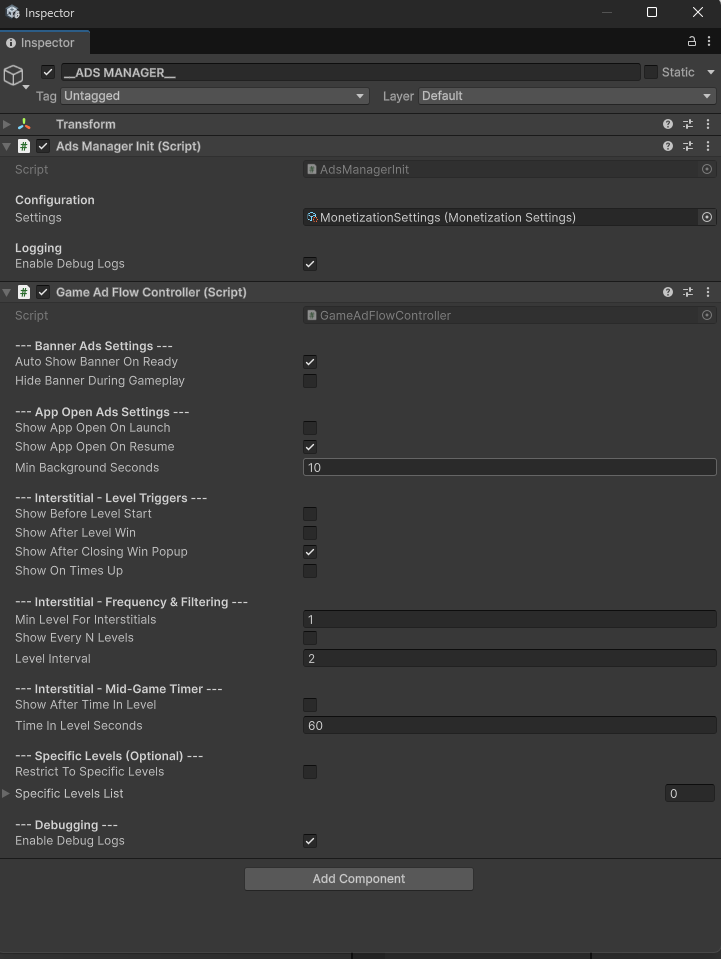
| Area | Settings and meaning |
|---|---|
| Banner | Auto Show Banner On Ready; Hide Banner During Gameplay. |
| App Open | Show App Open On Launch; Show App Open On Resume; Min Background Seconds before a resume is eligible. |
| Level triggers | Show Before Level Start; Show After Level Win; Show After Closing Win Popup; Show On Times Up. |
| Frequency | Min Level For Interstitials; Show Every N Levels; Level Interval. |
| Mid-game timer | Show After Time In Level; Time In Level Seconds. |
| Specific levels | Restrict To Specific Levels and its level list. |
| Debugging | Enable Debug Logs for checking triggers. |
These settings decide when the game requests an ad. Availability still depends on the connected ad system.
Existing rewarded calls
| Location | What happens after a successful reward result |
|---|---|
| Level Complete | Claims the multiplied reward. |
| Time's Up | Adds the configured continue time and resumes. |
| Out of Lives | Adds Lives Awarded Per Ad. |
| Need More Room | Attempts the configured rescue booster. |
To move an existing rewarded action to another button, replace the Button reference in that popup's component. Keep the popup responsible for the call and reward result.
A second independent rewarded placement needs a result-aware action. The current Game Ad Flow Controller does not provide a generic Inspector button action for choosing any reward. Reuse a supported popup flow for a no-code change. A different reward behavior needs its own integration; simply showing an ad is not enough to safely deliver a reward.