Currency ScriptableObject
Currency SO stores one shared balance that can be referenced throughout the project. It supports integer or floating-point values, automatic PlayerPrefs persistence and focused change events.
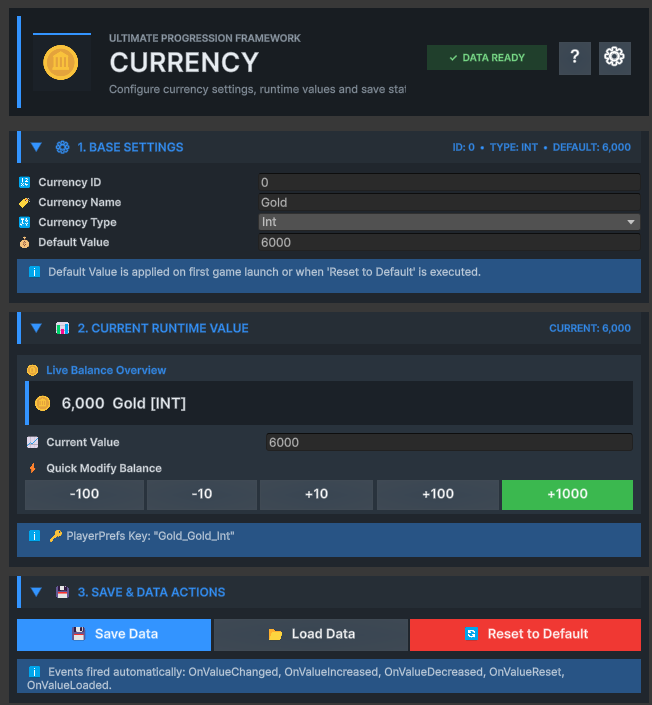
Create a Currency asset
-
01
Open Create menu
Right-click in the Project window.
-
02
Choose Currency
Select Bcyly Labs › Ultimate Progression Framework › Currency.
-
03
Assign a unique ID
Currency IDs are used by economy APIs and must not be duplicated.
-
04
Set a stable name
The name participates in persistence keys and economy matching.
1. Base Settings
Defines the currency identity, numeric behavior and first-run balance.
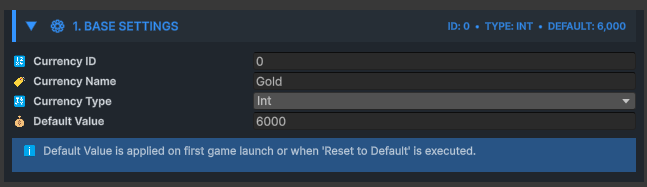
| Field | Purpose | Guidance |
|---|---|---|
| ID | Integer lookup key for public APIs | Keep unique across Currency assets |
| Currency Name | Display and economy-matching name | Keep unique and stable |
| Type | Int rounds values; Float preserves decimals | Choose according to gameplay precision |
| Default Value | Balance used when no save exists | Set the intended first-run amount |
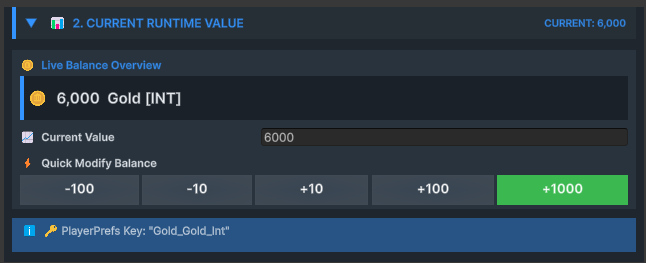
2. Current Runtime Value
Displays and modifies the live shared balance for development and runtime testing.
GetValue returns the balance after applying the configured numeric type. SetValue replaces it; ModifyValue adds a positive or negative delta. Both operations save immediately and raise change events.
gold.SetValue(500f);
gold.ModifyValue(75f);   // Gain 75
gold.ModifyValue(-25f);  // Spend 25

if (gold.HasEnough(100f))
Debug.Log("Purchase available");3. Save & Data Actions
Provides manual Save, Load and Reset operations around the automatic persistence behavior.
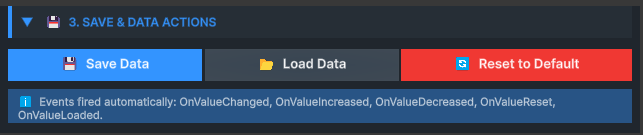
| Action | Behavior |
|---|---|
| Save | Stores the typed current value in PlayerPrefs |
| Load | Loads the typed key or falls back to Default Value |
| Reset | Restores Default Value, saves and raises OnValueReset |
Currency events
| Event | Value passed |
|---|---|
| OnValueChanged | New current balance |
| OnValueIncreased | Positive amount gained |
| OnValueDecreased | Positive magnitude deducted |
| OnValueReset | Reset balance |
| OnValueLoaded | Loaded balance |